Sagicc Updates: More speed, better organization and better results 🚀📢🆕
Hello! 👋🏻
At Sagicc, we work continuously to provide a more robust, intelligent platform adapted to the real needs of your operation. In this new update, we've added improvements ranging from smart ticket duplication and data validation in forms to new WhatsApp communication capabilities and a more comprehensive homepage experience. Discover them below:
Copying tasks when duplicating a ticket from the Business Rules module 📋
Ticket duplication from the Business Rules module is now much more efficient. When a ticket is duplicated into a campaign that shares the same form as the original ticket, Sagicc will automatically copy all associated tasks, transferring the work history without manual intervention. This allows your team to save valuable time, ensure data consistency, and streamline workflows in scenarios involving recurring or similar tickets.
Character length validation in task form text fields ✅
Data quality begins at the moment of registration. That’s why we’ve added the ability to specify a minimum and maximum length for text fields within the task form settings. Now, during ticket management, Sagicc will automatically validate that the entered information meets the defined limits before it is saved. This helps your team maintain cleaner, standardized databases, reduce data entry errors, and guarantee information integrity in every interaction.
Interactive "Call To Action" WhatsApp templates 📲
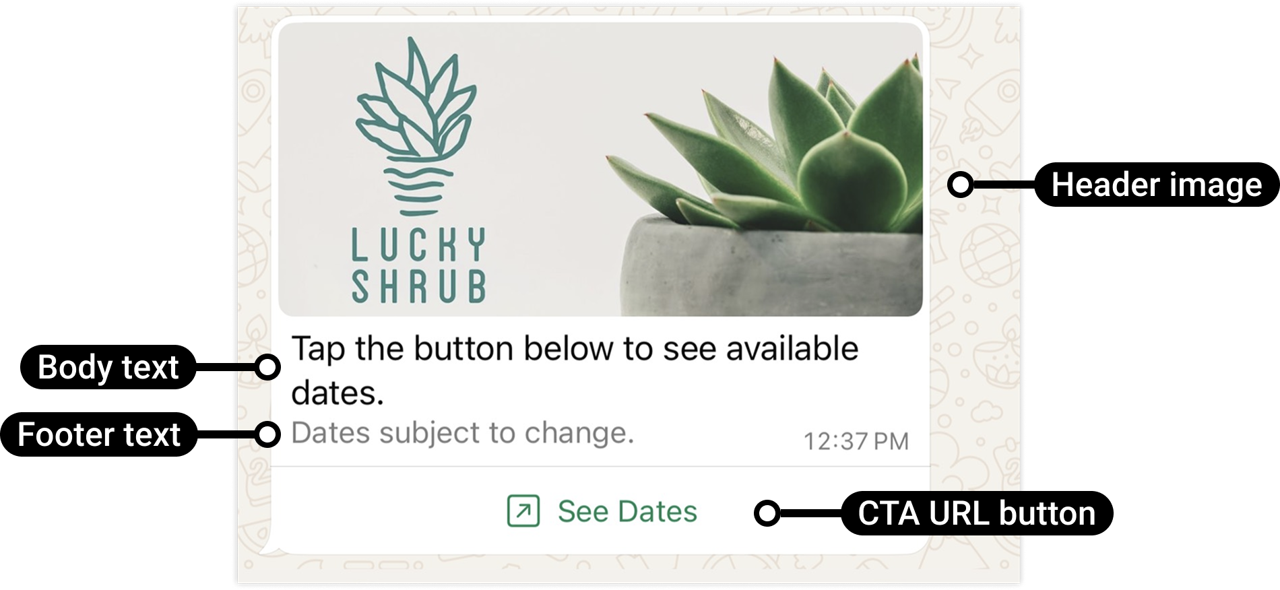
Take your WhatsApp communications to the next level. Sagicc now supports interactive templates with "Call To Action" buttons, allowing you to include a button directly in the message to open a specific URL. Unlike conventional templates, this type eliminates the need for customers to manually copy or search for links, guiding them to the desired URL with a single tap. This will increase response and conversion rates, provide greater confidence to the recipient by keeping the message clean and professional, and allow your team to design more direct, dynamic, and results-oriented conversational experiences.
Recent Tickets Managed displayed on the start page 👁️
From now on, you will have a more complete view of your recent activity. The "Recent Tickets Manages" widget on the start page has been improved to display the last 3 managed tickets simultaneously, whereas previously only one could be viewed. This allows your team to see the context of their most recent interactions at a glance, improving productivity by reducing navigation between screens and facilitating continuous follow-up on ongoing tickets.
Additionally, we have implemented performance improvements in campaign and user dashboards to store and update information more optimally. We’ve also added specific permissions for some functionalities to provide greater control over your team's actions and generally enhanced the email notifications Sagicc sends to users after performing various actions within the platform.
Each of these improvements has been designed to help your team work more agilely, securely, and efficiently. We invite you to integrate them into your operation and make the most of their full potential. For more details on these features, please consult the Sagicc User Manual or contact our Help Desk directly, where we will be happy to assist you.
Until the next update! 🚀